The following lists identify variable names that should be avoided because they are already used by JavaScript or the browser.
|
|
Operators:
Operator
Name
Data Types
Expressions
Values
+
Addition or
ConcatenationNumber
String3 + 1
4 + 7.432
"foo" + "bar"4
11.432
"foobar"
-
Subtraction
Number
7 - 2
5 - 3.3595
1.641
*
Multiplication
Number
2 * 5
10 * 9.77310
97.73
/
Division
Number
10 / 4
2.5 / 82.5
0.3125
%
Remainder
Number
10 % 4
2 % 0.752
0.5
&&
AND
Boolean
true && true
true && false
false && true
false && falsetrue
false
false
false
||
OR
Boolean
true || true
true || false
false || true
false || falsetrue
true
true
false
!
NOT
Boolean
!true
!falsefalse
trueComparison:
Operator
Name
Data Types
Examples
==
Equality
Number
String
Boolean3 == 3
"test" == "test"
false == false
!=
Inequality
Number
String
Boolean12 != 39
"foo" != "bar"
false != true
<
Less Than
Number
String12 < 3.1415
"a" < "b"
<=
Less Than or Equal
Number
String117 <= 17
"ABC" <= "ABD"
>
Greater Than
Number
String112 > -4
"foo" > "bar"
>=
Greater Than or Equal
Number
String13.99 >= 3.98
"fool" >= "foo"
1. Strings follow standard dictionary ordering, i.e.,
"A" < "B" < ... < "Z" < "a" < "b" ... < "z"
"a" < "aa" < ... < "ab" < "aba" < ... < "b"Statements:
Statement Name
General Form
Examples
Comment
Assignment Statement
The value of the expression on the right-hand side is assigned to the variable
on the left-hand side.
If-Then Statement
While Loop
Built In Functions:
Function
Examples
Result
Square Root
x = Math.sqrt(9);
x == 3
Absolute Value
x = Math.abs(-23);
y = Math.abs(99);x == 23
y == 99
Maximum
x = Math.max(3,14);
x == 14
Minimum
x = Math.min(3,14);
x == 3
Power
x = Math.pow(2,3);
x == 8
Floor
x = Math.floor(3.14159);
y = Math.floor(4.5623);x == 3
y == 4
Ceiling
x = Math.ceil(3.14159);
y = Math.ceil(4.5623);x == 4
y == 5
Round
x = Math.round(3.14159);
y = Math.round(4.5623);x == 3
y == 5
ParseFloat
x = parseFloat("12.8");
y = parseFloat("ABC");x == 12.8
y == NaN
Prompt
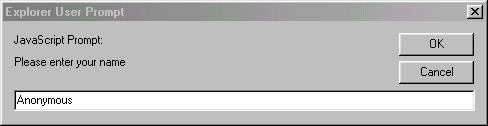
yourName = prompt("Please enter your name","Anonymous");
The following dialog box will appear, and yourName will be assigned the value that is entered in the text field.
Write
document.write("Howdy");
document.write(2+3);displays "Howdy"
displays 5User Defined Functions
Action
General Form
Examples
Function Definition
Function Call